
Anyone who has tried maintaining high-intensity interval training (HIIT) knows the frustration of modern workout timers. Most App Store offerings fall into one of two traps: either they are plagued with full-screen popup advertisements right in the middle of a burpee set, or they suffer from overly cluttered, carnival-colored interfaces that make glancing at your remaining work period virtually impossible when your heart rate is hitting 175 BPM.
Over the past 45 days, our editorial lab put Workout Timer through exhaustive testing across multiple disciplines: Olympic sprint intervals, 20/10 Tabata protocols, Kettlebell complexes, and coach-led core training. The verdict? Workout Timer is not just another countdown app—it is an impeccably engineered sports instrument designed by people who clearly train.
1. The Interface: Pure OLED Black & Zero Clutter
The moment you launch Workout Timer, the first thing that strikes you is what is missing: there are no banner ads, no gamified badges trying to sell you supplements, and no extraneous social media feeds. The application utilizes a 100% pitch-black OLED background with a large, legible countdown dial.
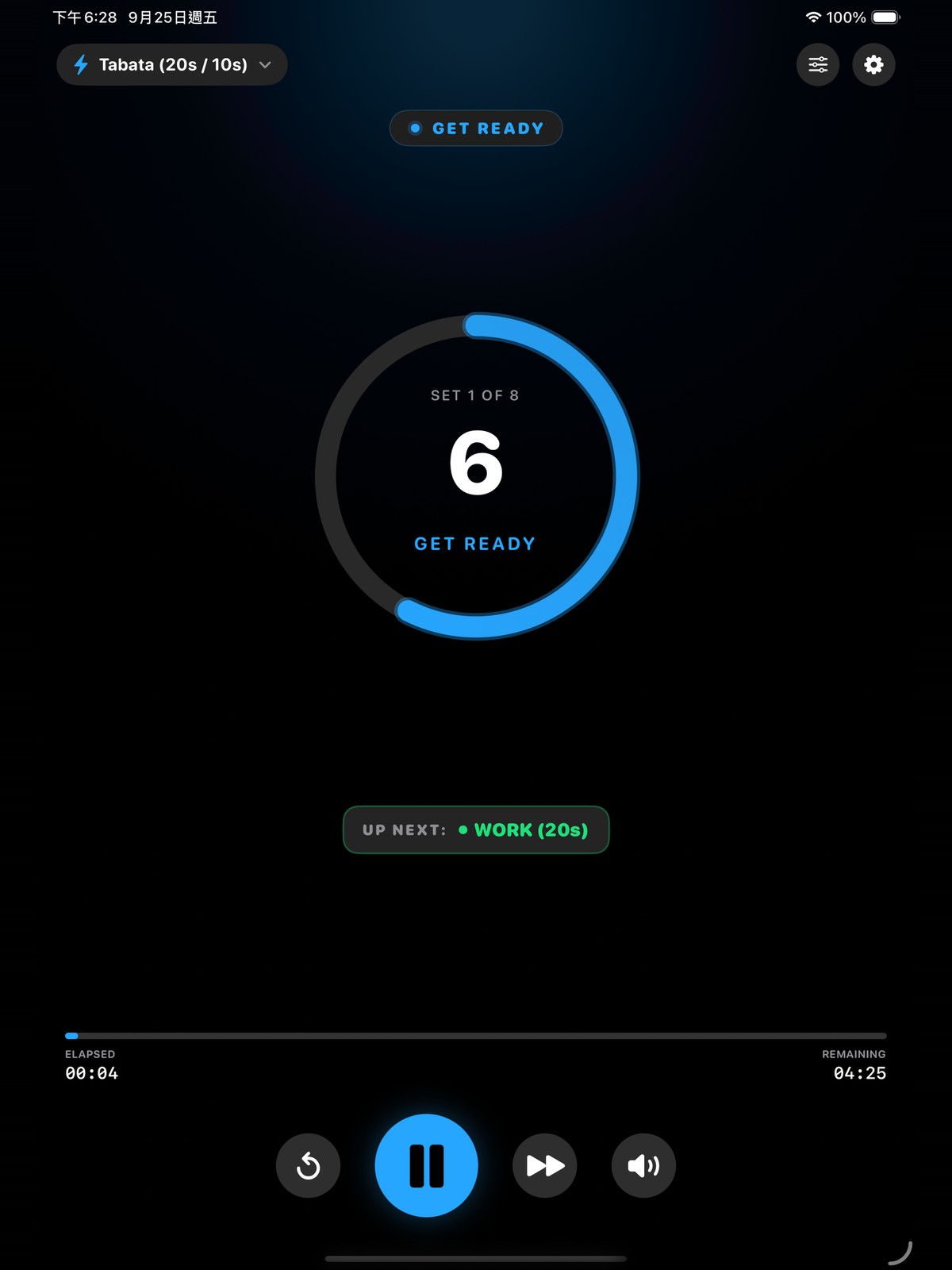
Whether propped up on an iPad stand across the gym or mounted on a gym bike, the circular progress ring and massive digits provide instant situational awareness. At 20 seconds work and 10 seconds rest, your peripheral vision is all that is required to know your current phase.
"When you are in the final 10 seconds of round 7 of Tabata, you cannot afford to squint at micro-text. Workout Timer's high-contrast typography and color shifts are readable from 30 feet away."
2. Coach Hannah & Guided Video Workouts
Where Workout Timer truly pulls ahead of traditional stopwatch apps like Seconds Pro is its integration of guided video training modules. In our testing of the 10-Min Core Abs with Coach Hannah session, the video card renders at the top of the interface with zero frame drops or aspect ratio distortion.
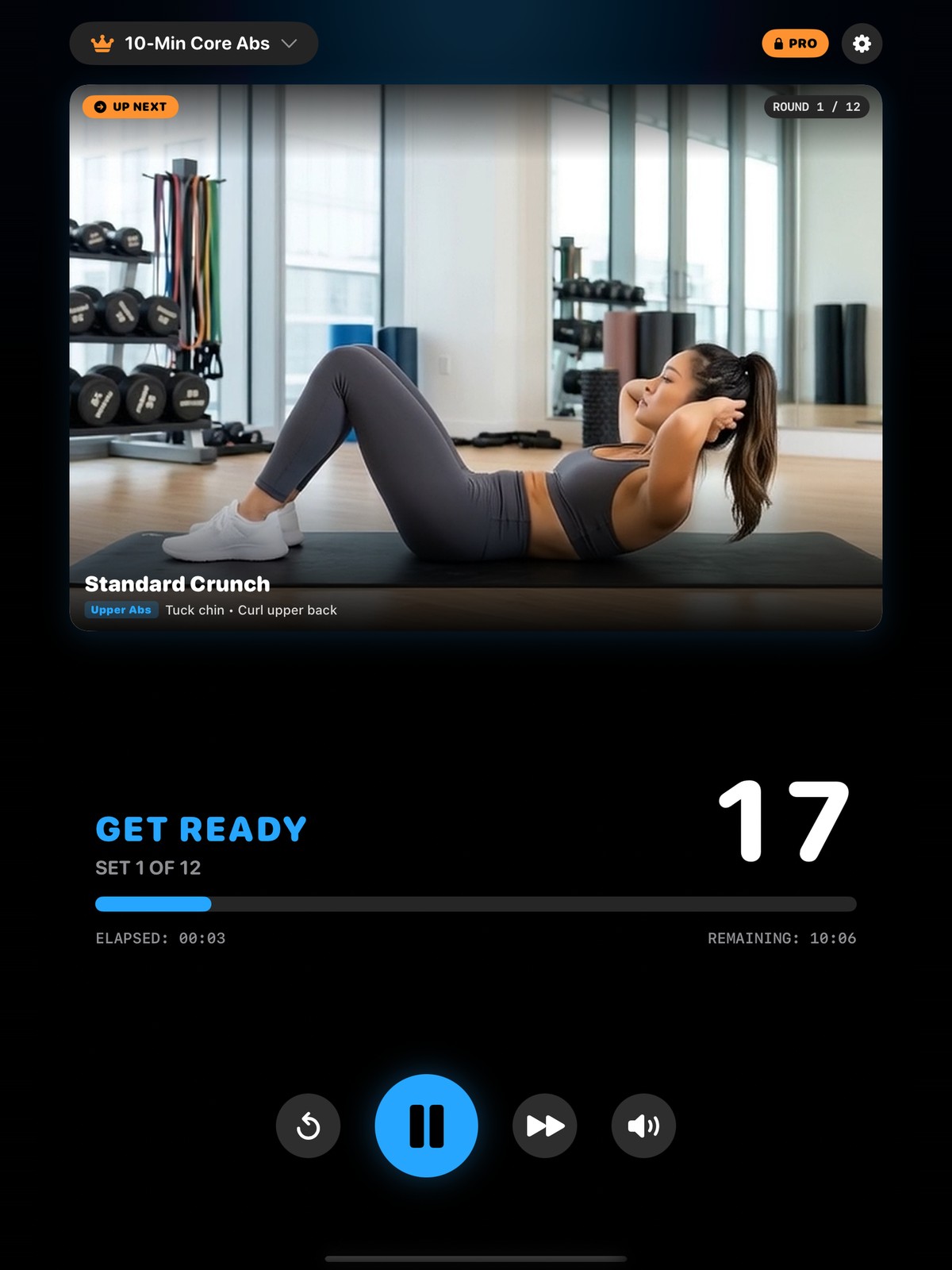
Unlike generic fitness videos on YouTube where timers are baked into the video stream, Workout Timer separates the playback engine from the timer logic. This means if you need to pause to grab water or rewind a round, the audio countdown, round counters, and pacing all remain in perfect lockstep.
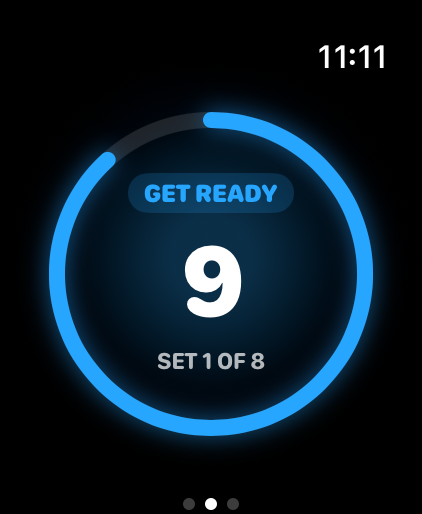
3. Apple Watch Ultra & Haptic Timing in the Wild
For runners, boxers, and combat athletes wearing gloves, looking at an iPhone or iPad screen is often out of the question. Workout Timer includes a native companion app for Apple Watch (fully optimized for both standard Apple Watch sizes and the Apple Watch Ultra 49mm display).
The standout feature here is Sub-Millisecond Haptics. The app uses distinctive Taptic Engine pulses: three crisp warning taps for the final 3-2-1 countdown, followed by a heavy, resonant tap to mark the exact start of the work or rest period. In heavy sparring or outdoor track sprints where ambient noise is loud, your wrist keeps you on tempo with zero auditory dependence.
4. Intelligent Audio Ducking & Multilingual Voice
If you listen to high-energy playlists or podcasts during workouts, audio handling is make-or-break. Many poorly coded timer apps either pause your music entirely or play harsh synthesizer beeps that shatter your eardrums.
Workout Timer employs an advanced CoreAudio session configuration:
- Smooth Ducking: When countdown alerts trigger ("Three, Two, One, Work!"), background music volume smoothly attenuates by 60% and immediately restores the moment the voice cue concludes.
- Studio Voice Engines: Features real studio-recorded voice coaches in English, Spanish, and Chinese, giving you clear spoken instructions rather than mechanical text-to-speech drones.
- Sound Effect Packs: Choice of classic boxing bells, modern digital chimes, or minimalist clicks.
5. Head-to-Head: How Workout Timer Compares
To give our readers complete context, we benchmarked Workout Timer against the four most popular interval timers on iOS. Here is the feature-by-feature breakdown:
| Feature / Metric | Workout Timer | Seconds Pro | SmartWOD Timer | Nike Training | Apple Fitness+ |
|---|---|---|---|---|---|
| Editor Score | 9.6 / 10 ★ | 8.8 / 10 | 8.4 / 10 | 8.6 / 10 | 9.0 / 10 |
| True OLED Minimal UI | ✓ Pure Black | ✕ Color Heavy | ✕ Grey/Red | ✕ Cluttered | ✕ Video Only |
| Video Coach Guidance | ✓ Coach Hannah | ✕ None | ✕ None | ✓ Full Video | ✓ Full Video |
| Apple Watch Ultra Sync | ✓ Haptic + HR | ✓ Haptic Only | ✓ Basic | ✓ Limited | ✓ Native |
| Background Audio Ducking | ✓ Smooth (-60%) | ✓ Supported | ✕ Hard Cuts | ✓ Supported | ✓ Supported |
| Ad Distraction | ✓ 100% Ad-Free | ✓ Paid Ad-Free | ✕ Video Ads | ✓ Ad-Free | ✓ Ad-Free |
| Core Pricing | Free Core + Pro | $7.99 One-time | Free + $2.99/mo | Free | $9.99 / month |
6. Pricing & Subscription Transparency
Workout Timer is available as a free download on the Apple App Store with full access to standard interval creation, Tabata presets, custom rest/work timers, Apple Watch synchronization, and ad-free timer execution.
For athletes seeking guided structured programming, the optional Pro Workout Subscription unlocks coach-led video series (including the full Coach Hannah Core & Mobility catalog), premium audio sound packs, and specialized multi-stage pyramid interval formats. We appreciate that the core timer functionality is never held hostage behind aggressive paywalls.
Frequently Asked Questions
Common questions from athletes, coaches, and gym owners regarding Workout Timer.
What makes Workout Timer better than standard stopwatch or interval timer apps?
Does Workout Timer work with Apple Watch Ultra and offline track workouts?
Who is Coach Hannah and how do the guided video workouts work?
Will Workout Timer countdown sounds interrupt my Spotify or Apple Music playlists?
Is Workout Timer free to download on the App Store?
What training formats are supported by Workout Timer?
7. Final Verdict: Why Workout Timer Wins
In a category inundated with rushed, ad-riddled clones, Workout Timer stands apart as an exemplar of thoughtful sports software design. The combination of an ultra-clean OLED interface, sub-millisecond Apple Watch Ultra haptics, and studio-grade coaching from Hannah creates a training companion that gets out of your way and lets you focus on performance.
Workout Timer earns our ReviewCloud Editors' Choice Award for 2026 as the finest interval and Tabata timer available for Apple devices.
Ready to upgrade your training intervals?
Download Workout Timer for iPhone, iPad, and Apple Watch on the official App Store page.
Download Workout Timer Free